Monday, January 08, 2007

Periodic Table of Visualization Methods


An extremely cool collection of visualization methods. You can mouse over to get an example of each.

Friday, January 05, 2007

PEP 8 checker

PEP 8 checker for the anal retentive in all of us. :)


/Users/gergely/twp/twp/bot.py:32:16: W291 trailing whitespace
sys.exit(1)
^
JCR: Trailing whitespace is superfluous.

/Users/gergely/twp/twp/bot.py:34:1: E302 expected 2 blank lines, found 1
def refresh_images(limit=dbbot._default_limit):
^
Separate top-level function and class definitions with two blank lines.

Method definitions inside a class are separated by a single blank line.

Extra blank lines may be used (sparingly) to separate groups of related
functions. Blank lines may be omitted between a bunch of related
one-liners (e.g. a set of dummy implementations).

Use blank lines in functions, sparingly, to indicate logical sections.


I'm the kind of masochistic guy who actually enjoys this kind of thing, but I need to figure out a better way to integrate it with PyDev. I wonder what's the easiest way to make Eclipse jump to the line where the error happened. Hmm...

TurboGears 1.0 and beyond

Kevin Dangoor, TurboGears project lead announced 1.0 this week on IRC.

I was there and I have this pretty screenshot to prove it! :)


Maybe even more importantly, TurboGears has a new leader: Alberto Valverde.

I was too busy to stay there for the followup discussions, but the gist of it seemed to be that a heavily WSGI based approach (sounded much like Pylons) will solve all problems including world hunger and the conflict in the Middle East.

Another equally important thing was the direction that is planned for TurboGears 2.0: decentralization and modularization. From what I understand people want to fork off chunks of TurboGears into fairly independent and externally reusable projects and keep TurboGears a small chunk of glue code that connects them together.

On the one hand this is not new, TurboGears started out by integrating a bunch of preexisting tools. ToscaWidgets was forked off recently from the TurboGears widget code. I agree that this approach can work to a certain extent. My guess is that in the case of TG the current change of direction (actually returning to its minimalistic roots) was more organizational than architectural. (Not that you can separate the two: see Conway's Law)

But there are pros and cons to decoupling. Unix command line tools are a good example. They were great, because there were standard interfaces between them which let them develop and be tested independently. But there is also a huge lack of conceptual integrity compared to monolithic frameworks. The naming conventions are inconsistent, different switches are used for the same functionality in different programs, etc.

The big advantage of monolithic frameworks is consistency in design. Modules use the same naming and coding style, have similar layouts. They reuse the low level utility code, the documentation tool, the testing framework, the bug reporting, the build and packaging system. There is one well known place to ask questions, to look for documentation, to download the latest stable release.

Linux distributions are a good example of both the strengths and weaknesses of heavily modularized systems. Probably the biggest advantage is that there is a huge amount of code reuse, and you can decentralize work to thousands of volunteers, maintaining the individual packages which can evolve independently.

On the other hand some combinations of packages are not tested properly, only certain combination of packages are well supported. If you report a bug that has been fixed in the upstream version, but not in your distro, you're on your own. Linux and Firefox is a good example.

People who want to support your software have a harder time when instead of a standard way, you have an infinite combination of modules. Just think of LSB and desktop Linux vs Mac OS or Windows.

We'll see how loose coupling works out for TurboGears. Interesting times ahead.

Tuesday, January 02, 2007

7zip is amazing

7zip just blew my pants off. Back in the day I though I was edgy when I used bzip2 instead of gzip, but this is just amazing.

I downloaded the full edit history of the Hungarian Wikipedia to run some analysis on it and 7z compressed it to 1/87th of its original size.

barcika:~/wp/huwiki$ du -k *
11502112 huwiki-20061205-pages-meta-history.xml
131808 huwiki-20061205-pages-meta-history.xml.7z
Of course this was superverbose XML, but the compression rate is still very impressive. The same original compressed with bz2 is almost 4 times as big. 7zip gonna be my first choice for archiving large log files.

Tuesday, December 05, 2006

Switching is hard: learning keyboard navigation on Mac OS X

I was very excited to get my first Mac, a 17'' MacBook Pro a couple of days ago. It's my new development machine and it gives me great satisfaction that I finally got one box where I can just plug in my camera or iPod and they work, play a video from a website and it works, then type

sudo apt-get install postgres
man 2 recv
and they all work, too. I became a big fan of Front Row, the fonts on websites look great, Expose is easy to miss when going back to another system. Seems like heaven, except...

I found that keyboard navigation on the Mac sucks. Note that this is my first impression after only 2-3 days of use with no Mac guru around to teach me the secret art of Using a Mac Without a Mouse.

Examples:
  • I found no way to maximize the Safari window without using the mouse. Use case: I read Dilbert in Google Reader and it doesn't fit in the Window horizontally.
  • Navigating the menus by keyboard is really cumbersome. Instead of Alt-T, I need to press Ctrl-F2, T, Enter to get to the Tools menu for example.
  • I found no simple way in Finder to move or even rename files or directories without using the mouse.
  • I'm still looking for a Total Commander replacement. I tried MuCommander and XFolders, but they both lack a command line. I also managed to set up Midnight Commander inside iTerm after changing the terminal emulation and keyboard settings to xterm, but I still have trouble mapping the keys to the right functions. Having no insert key really hurts.
  • BTW, what's the deal with putting such a cramped keyboard on a 17 inch notebook? The old 17 inch HP laptop that I used had a full keyboard including a numeric keypad. There would have been plenty of room to put a few extra keys on the Mac, too.
My biggest gripe currently that navigating dialogs is a pain without the Windows/Linux Alt style shortcuts.
Example 1:

I'm in Eclipse and want to replace the string "foo" with "bar" in the text editor. I press Command-F for the Find dialog, type in "foo", press Tab, type in "bar". So far, so good. But how do I get to the Replace button without using the mouse? Press Tab 9 times? On Windows/Linux I press Alt and the corresponding keyboard shortcut. I haven't found the equivalent on Mac OS X.


BTW, I can't even get to the menu bar with Ctrl-F2 in Eclipse. It doesn't work out of the box.

Example 2: I don't know how to operate this dialog in iTunes with the keyboard. Tab doesn't work.


Please, someone tell me I'm a complete noob and there is a simple solution for everything described above. So far, I'm thinking about creating a big fat Windows partition in Bootcamp since I except that I'm gonna spend a lot of time back in Microsoft World (sacrilege!) if I can't get back to my original productivity level in Mac OS X.

Time to ask around the forums some more...

Monday, November 20, 2006

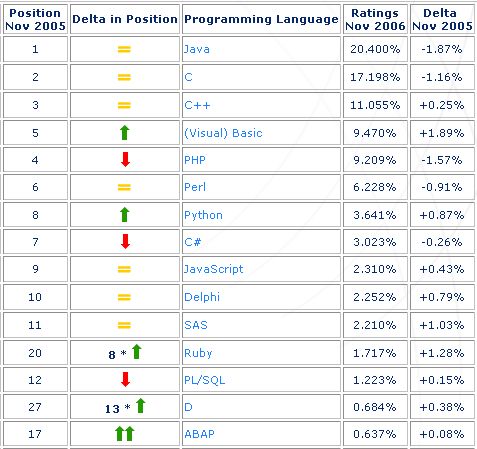
TIOBE Programming Community index

The TIOBE Programming Community index gives an indication of the popularity of programming languages. The index is updated once a month. The ratings are based on the world-wide availability of skilled engineers, courses and third party vendors. The popular search engines Google, MSN, and Yahoo! are used to calculate the ratings.
http://www.tiobe.com/tpci.htm via Java Posse


Socrates on SOAP

Two stories on web standards in imaginary dialog form.
Our industry moves from one stupid hype to the next. OOP, CASE, CORBA, ODBMS, Applets, push media (anyone remember "push media"?), VRML, Agents, JINI, Enterprise JavaBeans, Extreme Programming, Grid Computing, SOA, "Enterprise Service Bus".

We never learn. We're too afraid that we miss out on the Next Big Thing and our knowledge becomes obsolete. So we follow the hype. Even seemingly smart people fall victim to herd instinct. Billion dollar businesses are built on brain-dead technologies that look totally embarrassing in retrospect *cough* EJB 1-2 *cough*.

It's funny how little we learn from all this. We still believe the snake oil salesmen and are looking for the silver bullet. Heck, we're selling snake oil and silver bullets ourselves. We travel to the snake oil conferences, read and publish silver bullet books.

I think the problem is that the industry is too young and doesn't know its own history, so it can't learn from its past mistakes. Only the old people do, but no one listens to them any more. :)

Friday, November 17, 2006

The 30 Days IDE Swap Experiment (NetBeans / Eclipse)

I just found this interesting experiment in the JavaTools Community Newsletter. Developers are asked to switch IDE's (NetBeans/Eclipse) for 30 days. It's interesting to see what they said in the Q/A section (the rest I skipped).

To me the take away message is that when I need to do Swing / JSF work it's going to be worth looking into NetBeans.

For me, the evolution of my Java development environment of choice over the years was: vim -> XEmacs -> NetBeans (for Swing) -> Eclipse.

What I like most about Eclipse are the refactorings and the "quickfixes" (suggestions for fixing the code) and the cool code navigation features. Another big part of the Eclipse experience is that I can just start typing code without thinking about details, such as imports, field or superclass declarations, keep hitting Ctrl-1 and the IDE does all the busywork. Oh yeah, and the integrated JUnit support is also very nice.

Recently I had the misfortune of working on a C++ project in Visual Studio for a while and the pain was almost unbearable every time I had to go through a save / compile / link cycle to catch silly mistakes. Things that are instant in Eclipse took minutes.

Tuesday, November 14, 2006

IronPython and Jython

Right now, I don't do any kind of .NET development at all, but to be honest I got envious of IronPython after seeing this demo screencast. IronPython is the implementation of Python on top of .NET.

The somewhat sad story here is that Jim Hugunin, its author first created Jython on top of the JVM. It was pretty impressive back then, I remember writing applets in it many, many years ago. (1998 I think?)

Jim later created IronPython and got hired by Microsoft, where he currently works. Smart guy, it's a shame that we lost him to the dark side. :)

Anyway, back to the demo. The things I liked:

  • The integration with Visual Studio looks great. I loved the example where your Python code calls a C# function and the debugger can show the mixed stack trace for both languages.
  • The speed is impressive. Seems to be on par with CPython, depending on the scenario. Jython doesn't even come close.
  • A minor, but nifty thing is that he has tab completition for every class and function in the .NET framework.

While IronPython is under heavy development, Jython seems to be almost abandoned. A few days ago I needed to do some log analysis as part of our all-Java build system and I wanted to use Jython to implement it. It was a disappointment though. It was slooow and the last release was more than a year ago, so it is not up to speed with the latest Python features at all. Shame really. It could be a great Groovy contender.

But here's hoping that Sun's hiring two JRuby developers, IronPython's progress and the support for dynamic languages in Java 6 will somehow help revive interest in Jython.

Update: the JRuby developers working for Sun even offered their help to Jython. Nice.

Rails / Django comparison

Found this on the Django mailing list. A nice Rails vs Django comparison.

I think there is one thing that both Rails and Django have over TurboGears: their main maintainers all use them to create web applications full-time, on a daily basis. I'm not sure whether this is true at all for TurboGears. But I'm still optimistic. The book is coming out real soon now and there is an ongoing effort to clean up the docs. The TurboGears users mailing list has 2300 subscribers vs. Django's 3300. A couple of month ago they were about the same. Hmm...